3D

3D layers, shapes and models in the same timeline as your 2D work, in 2.5D, real time or raytraced.

3D layers

Switch on 3D in a layer’s row and it gains depth, rotation in all three axes and a place in front of the camera.

The 3D Renderer menu in the Composition Bar decides how the scene is drawn: 2.5D for flat layers in perspective, the Rasterizer for real 3D in real time, or the Raytracer for physically based light. Next to it you set anti-aliasing, exposure and tone mapping, and switch between the camera view and the free 3D Space view.
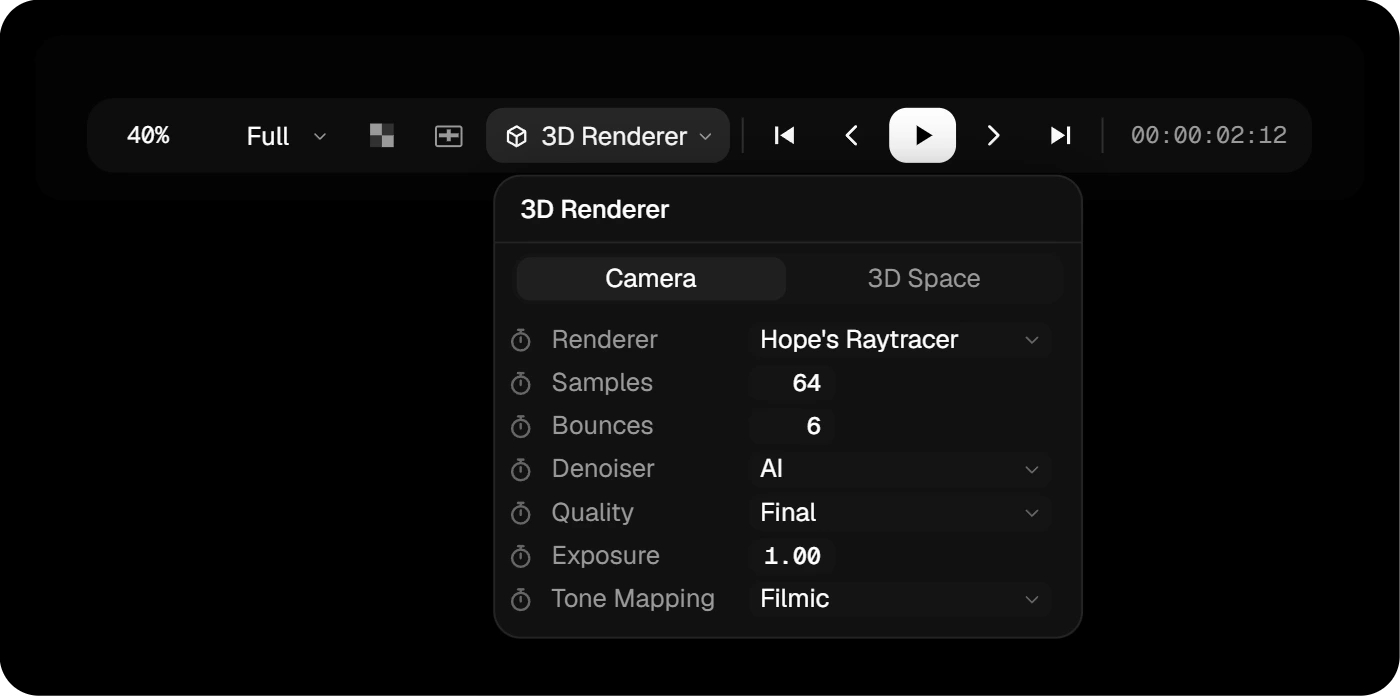
The 3D Renderer menu with View, Renderer, Anti-Aliasing, Exposure and Tone Mapping

2.5D

New comps start with Hope’s 2.5D: flat layers arranged in 3D space and seen through a camera. Text and vector shapes stay as crisp as in 2D, at any distance.

  • Layers that pass through each other are split cleanly where they meet.
  • Blend modes and camera depth blur (Gaussian or Bokeh) keep working.
  • It’s fast: even busy camera moves play back in real time.

Add a light, a 3D Shape, a model or particles and the comp switches to the Rasterizer by itself.

Rasterizer

The Rasterizer draws real 3D: extruded text and shapes, 3D Shapes, models and particles, lit and shaded as you work.

  • Light from HDRI environments; six come with the app.
  • Directional, spot, point and environment lights, with soft shadows from up to eight of them.
  • Anti-aliasing up to 8×, for clean edges in the final render.

Raytracer

Studio

For the final look, switch to Hope’s Raytracer. Light bounces through the scene the way it does in reality: soft shadows, real reflections, area lights and glass.

  • The picture refines in the viewer while you look at it.
  • The built-in AI denoiser turns a quick, noisy preview into a clean image, so 16 samples look like a thousand.
  • Pick Preview quality while you work; export always renders Final.

Extrusion and 3D Shapes

Text, shapes and SVGs extrude into solid 3D objects straight from their vector paths, with round, angled or concave bevels. Turn on Separate Edge and the sides get a material of their own.

3D Shapes add the basics in one click: cube, sphere, cylinder, cone, torus, capsule and pyramid.

Particles

Two ways to fill a scene with particles, both in real 3D, so other objects hide them where they should.

  • Particles layer, the last button in the Create Bar: thousands of particles in a space you size, drifting on turbulence. Set the count, size, color or a gradient, soft edges, depth fade and glow, or use any layer’s picture as the particle.
  • Ball Scatter, in the clip: turns a layer’s picture into a grid of balls that scatter in X, Y and Z, or push out by brightness, saturation, hue or a color channel. Made for dissolves and reveals.

Nothing to simulate first: every frame is worked out on its own, so scrubbing, playing and rendering always look the same.

.glb models

Import or drop a .glb or .gltf file and it becomes a 3D Model layer, with its textures exactly as they were made.

  • Every material in the file gets its own settings, starting from the file’s own look.
  • Keep it Original, or switch a single part to a color, a layer’s picture or a material preset.
  • Lights, shadows, the camera, 3D Motion Displace and both renderers work on it like on everything else.

No models of your own? Sites like Sketchfab, CGTrader and Poly Haven have thousands of free ones to download as .glb. Check each model’s license before you use it in client work.

Materials

Every 3D object has a Surface, and one field decides what it is made of:

  • Color: one color, with Roughness and Metallic for anything from matte plastic to polished metal.
  • Layer: the picture of any other layer as a texture, a video playing on a screen for example.
  • Preset: nine real materials that come with the app: Gold, Steel, Brushed Aluminium, Concrete, three marbles and two woods, with Tiling and Normal Strength. Custom… loads your own texture set.

Text and shapes can have a second material on their edges. To make an object glow or turn to glass, add the Emission or 3D Glass effect.

Depth Blur

Turn on Enable Depth Blur on a camera and everything outside the focus goes soft, the way a real lens does it.

  • Focus Distance sets what is sharp, Blur Amount how soft the rest gets. Both can be animated for a focus pull.
  • Blur Range blurs both sides, or only behind or in front of the focus.
  • In 2.5D, choose Gaussian or Bokeh. The Rasterizer and Raytracer always blur like a lens.

3D Glass

Studio

Add the 3D Glass effect to a 3D layer and it becomes glass. Two controls do the work: Refraction for how strongly it bends the light, and Chromatic Aberration for rainbow edges.

Tint it with the surface color and frost it with roughness. Layers behind the glass are refracted through it.

3D Glass needs the Raytracer.

3D Motion Displace

Studio

The 3D version of Motion Displace. Extruded text, shapes, 3D Shapes, models and tubes lag behind, bend and swing past their target, all from the way they already move.

One control, Viscosity, sets how soft the object is. Hold At picks the point that stays put: the anchor, a side, the center, the front or the back.