Modifiers

Shake, bounce, follow the music: right-click any value and add motion on top, no keyframes needed.

Modify with

Studio

Right-click any value in the timeline or in Effect Controls and choose Modify with. A modifier adds motion on top of your keyframes and expressions, and the menu only offers the ones that fit the value.

  • Its settings are values like any other: keyframe them, undo them, save them with the project.
  • Stack as many as you like, and switch each one on or off.
  • Added to every selected layer at once. On 3D layers they move in depth too.
  • Values moved by a modifier show in the accent color, so you always see what is driven.
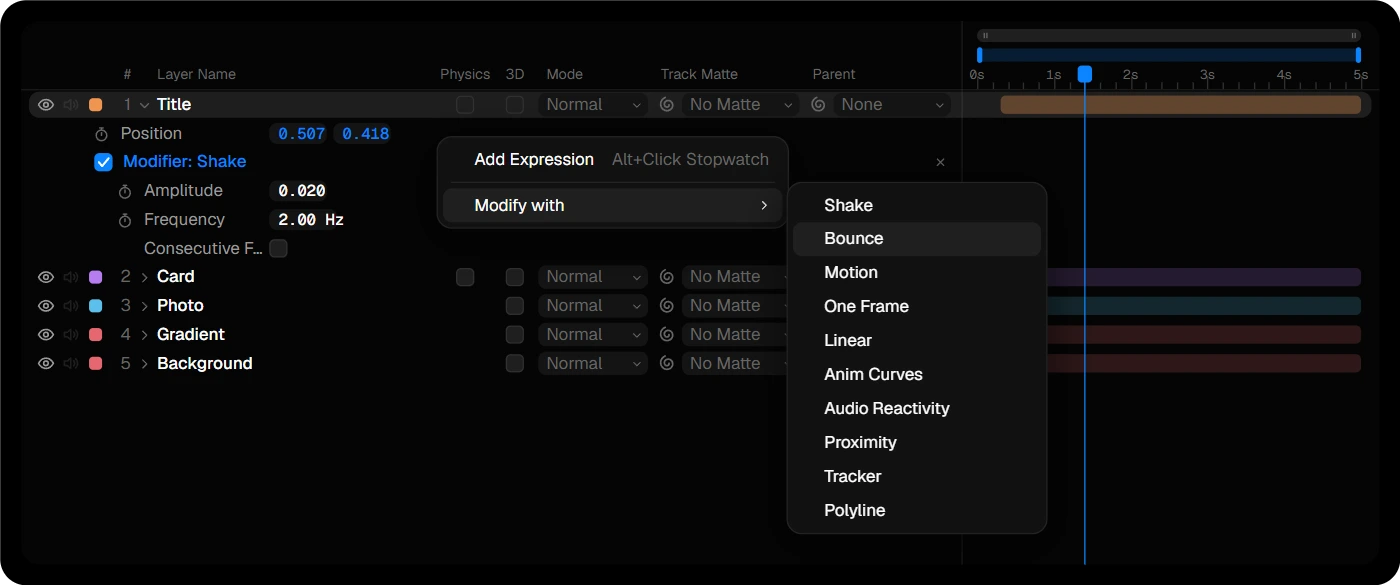
The Modify with menu open on a Position property, with a Shake modifier below

Shake

Studio

A smooth, random wiggle. Amplitude sets how far the value moves, Frequency how many wiggles there are per second. X and Y move on their own, and every property gets its own randomness, so two shaken layers never move in step.

Turn on Consecutive Frames and set Hold Frames to hold each value for a few frames: a stepped, stop-motion jitter.

Bounce

Studio

Set your keyframes and add Bounce: the layer carries its speed into each keyframe and swings out from there. Amplitude, Frequency and Damping set how far it swings, how fast, and how quickly it settles.

Elastic swings to both sides, Floor only to one, like a ball hitting the ground. Only the keyframed motion bounces, so it needs at least two keyframes.

Motion

Studio

An animation without keyframes. Pick a curve, Linear, Ease In, Ease Out, Easy Ease or the elastic Ease In and Ease Out, then set how far the value goes and when the animation starts and ends.

The timing counts from the start of the layer, so the animation moves with it when you slide the layer along the timeline.

Linear

Studio

A steady change for the whole length of the layer: Rate per Second. On Scale, 2 grows the layer by 2 % every second, the slow push-in a still photo needs. On Position it drifts, and a negative rate shrinks or falls instead.

One Frame

Studio

Changes a value on single frames only: a flash of brightness on the first frame, a jump on the last. Frames are counted from the start or the end of the layer, so they stay in place when you trim or move it. Add as many frames as you like with Add Frame.

Anim Curves

Studio

Shapes a value over the whole layer, from its first frame to its last, with a curve you drag into shape. Set where the value starts and how far the curve takes it. Trim the layer and the animation stretches with it.

Turn on Mirror and the curve runs to the middle of the layer, then back again to where it started.

Audio Reactivity

Studio

Moves a value with the sound. Pick a sound layer, by default the one below, or the whole comp’s audio, and a band: Full, Bass, Mids or Highs. It even listens to muted layers.

  • Max Value: how far the value goes at the loudest moment.
  • Release: lets each hit ring out.
  • Smoothing: soft waves instead of sharp spikes.

Turn the sound on in the clip to hear what it follows.

Proximity

Studio

Reacts to another layer. Pick a Target Layer: the closer it comes, the more of Amount is added. Radius sets how far it reaches, Falloff whether the edge is hard or a soft fade.

On a position, Mode offers Push Away as well: the layer gives way straight from the target, as far as needed, and never lets it come closer than the Radius.

Put it on the Scale of a grid of dots and move one layer through it: every dot grows as it passes. Distance is measured in the comp, with parenting and in 3D.

Tracker

Studio

Pins a layer to a point tracked in the footage. Choose a layer with a Tracker and the Position follows it while the layer keeps its own place. With a Position, Rotation & Scale track, it turns and scales along too.

Labels, arrows and graphics stay on the moving object, even when the shot is stabilized.

Polyline

Studio

Moves a layer along a Polyline layer. Progress runs from 0 to 100 % along its length at an even speed, and a closed line loops. Add it to Rotation as well and the layer turns with the path.